Going down is a commitment: landing
Published
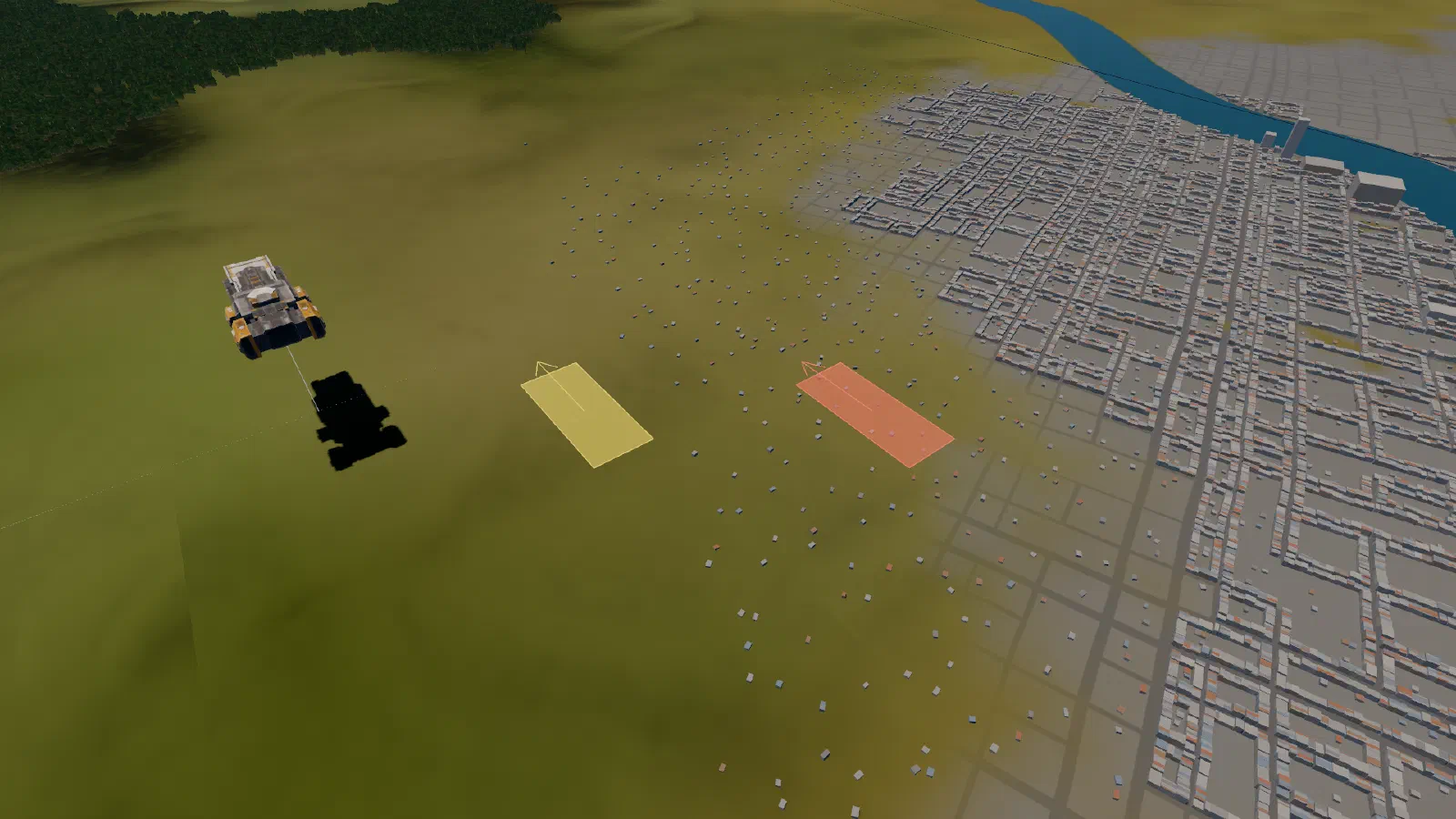
In short: any ship can land, even the carrier, but only when you order it. You pick the spot, the game shows each ship’s footprint: amber means yes, red means no. Landing is how you trade with a town.
At a glance
| Order | Shift+5, or Land on the command card |
| Who | every ship, the carrier included |
| Not on | water, towns, steep ground, other ships |
| Lift off | any new order, or an enemy in reach |
How it works
- Pick the spot: press on the ground and drag to set the facing.
- Check the footprint. Each ship’s footprint shows on the ground before you commit, amber if it can land and red if the spot is no good: off the area, too steep for the ship’s size, on water (sea, lakes or rivers), in a town, or on another ship. Any red refuses the whole order.
- Groups spread out round the spot by size, so ships don’t land on each other.
- Setting down: each ship flies there, drops to Low and settles on the ground.
- Lifting off: any new order takes a landed ship back up to Low. So does an enemy coming within weapon reach, and its pilot fights once it is up.
Why land
To trade, a ship must be landed inside a town’s trade ring, out of combat. Town centres are no-landing, but the farmland and open ground round them are fine.
Landing is never automatic. Going down is a commitment: the way out, a jump, leaves only from the Top height band.